
August 2025
The NursingCAS Dispatch is a monthly newsletter designed to update you on current happenings involving nursing’s centralized application service. The newsletter features:
- NursingCAS Know-How including key features, resources, recruitment opportunities, and reminders
- NursingCAS by the Numbers featuring application statistics and other relevant metrics and data
- User Updates to keep you in the loop, so you can keep your team and applicants in the loop
- Q&A providing answers to some of the most frequently asked questions from school users
 NURSINGCAS KNOW-HOW NURSINGCAS KNOW-HOW
 Managing Overlapping Cycles Managing Overlapping Cycles
The 2025-2026 NursingCAS cycle will launch on August 7. The current 2024-2025 cycle will remain open through January 29, 2026. With two NursingCAS cycles open simultaneously for 5 months, it is important that users accurately update hyperlinks so students can access the application in the correct cycle portal. We highly recommend that users place “Apply Now” buttons throughout their college website to easily direct students to the application in multiple places. Please reference the URL and Hyperlinks page to review your options.
 Required Webinar: Steps to Ensure a Successful 2025-2026 NursingCAS Cycle on August 18 Required Webinar: Steps to Ensure a Successful 2025-2026 NursingCAS Cycle on August 18
The 2025-2026 NursingCAS cycle will launch on Thursday, August 7. Register to attend our upcoming webinar, NursingCAS: Steps to Ensure a Successful 2025-2026 Cycle, planned for Monday, August 18, at 2:00 p.m. ET. The following topics will be discussed:
- WebAdMIT best practices and efficiency measures: local statuses, list manager, faculty/committee member review feature, automated scoring features, and more
- Steps to managing your applicant pool
- Tips for analyzing your applicant pool and recruitment efforts with the Report Manager and Analytics by Liaison tools
- AACN and NursingCAS recruitment tools
- NursingCAS and WebAdMIT training resources
At least one member from each institution must attend. If you cannot attend, please register to receive a copy of the recording.
️ ️ Save the Date: NursingCAS Discover Nursing School Virtual Fair on October 14
Mark your calendars! AACN is excited to announce that the NursingCAS Discover Nursing School Virtual Fair will take place on Tuesday, October 14, 2025.
This virtual event will allow NursingCAS schools to connect with prospective students through live chat, video, and panel discussions. Take advantage of this opportunity to showcase your programs, engage with applicants in real-time, and identify top candidates to fill open seats!
AACN encourages all NursingCAS schools to register for the fair today to host a virtual booth. We look forward to supporting your programs and maximizing visibility to our national applicant pool through this event.
 Configuration Best Practice: Link to Application Landing Page Configuration Best Practice: Link to Application Landing Page
As a reminder, NursingCAS member schools must link to the NursingCAS Application instead of the NursingCAS website when adding hyperlinks to NursingCAS on their school webpages.
For more best practices, visit the CAS Configuration Portal Help Center and register for our NursingCAS: Steps to Ensure a Successful 2025-2026 Cycle webinar on August 18.
️ Featured Liaison Academy Course | Getting Started with Liaison Analytics Featured Liaison Academy Course | Getting Started with Liaison Analytics
This introductory video offers an overview of Liaison Analytics, including how to log in to the system and navigate its various visualizations.
Liaison Analytics provides data-driven insights to help admissions teams spot trends in their applicant pool. It provides schools with a secure and robust way to explore multi-year applicant and application data using visual representations and dashboards, making it a complete solution for admission offices looking to optimize their efforts for growing or shaping their classes.
For more information on this tool, visit the Liaison Analytics Quick Start Guide in the WebAdMIT Help Center.
Create a free account with Liaison Academy and become a NursingCAS super user!
 AACN’s NursingCAS Marketing & Outreach Manager AACN’s NursingCAS Marketing & Outreach Manager
NursingCAS is excited to welcome Jessica Page as our NursingCAS Marketing & Outreach Manager! Jessica is responsible for developing robust CRM campaigns to drive student application growth, managing recruitment activities for prospective schools and applicants, and supporting marketing needs for the team.
 NursingCAS Applicant Newsletter & Recruitment Event Calendar NursingCAS Applicant Newsletter & Recruitment Event Calendar
The Applicant Newsletter, provided by AACN, is emailed to 160,000+ NursingCAS applicants the third week of every month. This newsletter is for programs affiliated with NursingCAS only. Program submissions are FREE and due on the Friday prior to publication. Posts must relate to one of the three topics below or they will be removed. Please submit an announcement using the form on our website.
Here is some additional information on how schools can leverage each section of the Applicant Newsletter:
- Open Seats: Use this section to provide notifications to applicants about NursingCAS programs with available space. You can share information about one specific program or multiple programs in one announcement. You can highlight the program by providing information relevant to your nursing school, specific program requirements, location, accreditation, program cost/scholarships, specialties, etc.
- Deadline Extensions: Use this section to share announcements about deadline extensions for your NursingCAS programs. You can share information about your programs, the new deadlines, and any requirements that might have changed (if applicable).
- New Programs: Use this section to highlight any new programs launched in the Application Portal since the last newsletter.
We recommend including contact information for representatives or links to your website and the NursingCAS application within the announcement. Visit the Newsletter Archive for samples of previous submissions.
The NursingCAS Events Calendar is a great platform for publicizing your program’s recruitment events. These events include student information sessions, virtual fairs, open houses, and other recruitment events that connect your institution with potential applicants. You can submit items to the Events Calendar using the Applicant Event Form. This calendar is distributed to 160,000+ students each month.
 WebAdMIT Sandbox Environment Refresh WebAdMIT Sandbox Environment Refresh
Are you utilizing the WebAdMIT Sandbox? If not, you should be! Sandbox is a duplicate test platform useful for testing and training purposes; any actions performed in Sandbox will not affect the live data in production. This tool provides users with a safe, “near-production” environment to test applications and run sample exports, among other actions. The WebAdMIT Sandbox is a copy of the WebAdMIT production environment with sensitive applicant information (such as surnames, email addresses, etc.) obfuscated.
The WebAdMIT Sandbox is refreshed between 9:00 a.m. and 2:00 p.m. ET every Monday. If Monday is a US or Canadian holiday, deployment is the next business day and includes all system changes from the preceding release. The WebAdMIT Sandbox environment is refreshed with current (cleansed) production data and program configurations. Any test exports, custom fields, etc., in the current Sandbox will be overwritten.
 BY THE NUMBERS BY THE NUMBERS
2023-2024 Applicant Demographics: First Gen, English as a Primary Language, HPSA
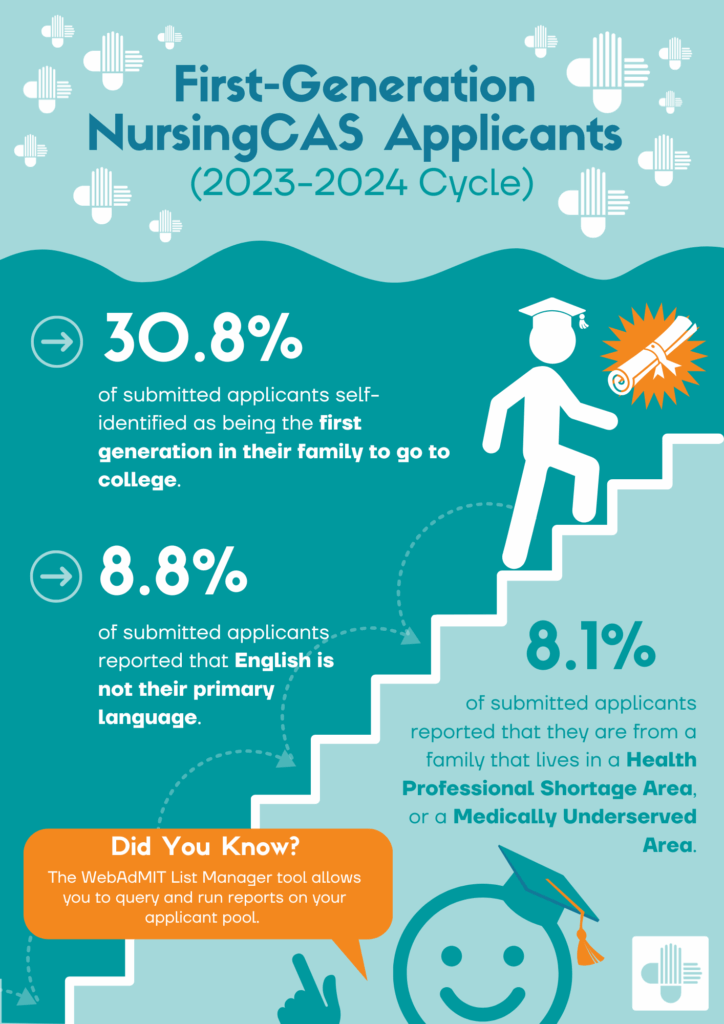
In the 2023-2024 cycle, 30.8% of submitted applicants self-identified as being the first generation in their family to attend college. 8.8% reported that English is not their primary language, and 8.1% reported that they are from a family living in a Health Professional Shortage Area or a Medically Underserved Area.
Are you interested in learning more about your applicant pool? The WebAdMIT List Manager tool allows you to query and run reports on your applicants with features that include:
- Run quick, basic searches on your applicants, such as searching by their name or grouping applicants by program.
- Build lists that filter applicants by multiple criteria (e.g., regional applicants, Verified applicants with a high GPA, etc.). Be sure to review the Template Naming Tips page for best practices in naming templates you create.
- Combine lists to create advanced searches (e.g., regional applicants who are Verified with a high GPA).
- Create a personal ad hoc list of applicants, setting them aside for later use.
For more information on this tool, visit the Using the List Manager page in the WebAdMIT Help Center.
 USER UPDATES USER UPDATES
This section provides monthly updates on new features and enhancements available within the Applicant Portal, Configuration Portal, WebAdMIT, and information on upcoming training opportunities. Please note that these are only a few highlights of Liaison’s recent enhancements. A complete list of recent WebAdMIT Release Notes is available.
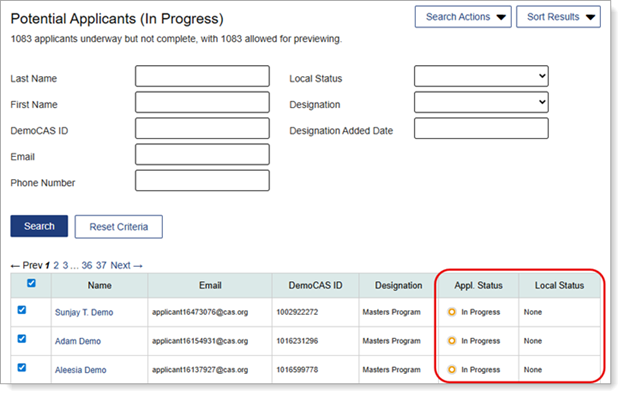
Potential Applicants (In Progress) Search Page Includes Columns for Application Status and Local Status
The Potential Applicants (In Progress) search page now includes Application Status and Local Status columns. This gives you more immediate access to key applicant data points within the search table.
Improved Editing and Adding Answer Sets to Conditional Answer Options Rule
When configuring Conditional Answer Options rules, you can now add new answer sets and make edits to existing answer sets in the same session by clicking the new Apply button when saving a new answer set. Previously, if you made these changes in the same session, your new answer set was deleted. This enhancement ensures you have data accuracy in the question change workflow.
Menu Bar and Page Header Remain Within Easy Access
When you scroll down a page in WebAdMIT, the Menu Bar on the left and the page header (which includes the Dashboard and Account links and the cycle switcher) at the top of the page now remain within easy access. Previously, the Menu Bar and page header were static on the page and would disappear when you scrolled down.
Subscribe to WebAdMIT Release Notes
WebAdMIT Release Notes provide a summary of enhancements and new features that are made available in the Applicant Portal, Applicant Gateway, Configuration Portal, Letters by Liaison, and WebAdMIT. Want to receive Release Notes emails? Subscribe here.
 Q&A Q&A
Q: How does NursingCAS determine whether verification is needed for my programs? Can I change this?
A: The transcript and coursework entry selections you make when configuring your programs will determine the level of verification performed by the CAS staff.
These selections are made in the “College Transcripts & Coursework” section under “Program Settings” in the Configuration Portal. Visit the Help Center for additional information.
See below for an overview of the different requirements that schools can have and their respective verification levels:
- Official Transcripts Sent to CAS: Applicants are required to have their official transcripts sent directly to the CAS by the issuing institution’s registrar’s office. Once received, the operations team validates each transcript for authenticity. Transcripts are provided in Liaison Outcomes and WebAdMIT as a high-resolution PDF. CAS also accept e-transcripts from National Student Clearinghouse and Parchment.
- Applicant Uploaded Unofficial Transcripts: Applicants can upload a copy of their unofficial transcript(s) directly in the Academic History section of the application. These transcripts are provided in Liaison Outcomes and WebAdMIT as a high-resolution PDF. Note that unofficial transcript(s) are not verified. If you are configured to accept unofficial transcripts, applicants who apply and have their transcripts processed for other programs requiring official transcripts are considered to have submitted their transcripts.
- Custom Transcript Sending Instructions: Applicants can view your custom transcript requirements, such as sending their transcripts directly to your institution or uploading them under the Program Materials section. Depending upon your instructions, these transcripts may or may not be available in Liaison Outcomes and WebAdMIT.
- No Transcripts Required: Applicants are not required to have transcripts sent directly to the CAS. These transcripts will not be available in Liaison Outcomes and WebAdMIT.
This section is also where you can select the type of coursework that you would like applicants to enter. Review the Help Center for more guidance and best practices on how your domestic transcript and coursework selections affect the GPAs provided and the applicant’s final application status.
Support for WebAdMIT School Users
As always, the dedicated WebAdMIT Client Support Specialist Team is available Monday through Friday, 9:00 a.m. – 5:00 p.m. ET to assist with questions about WebAdMIT features. The team can be reached at (857) 304-2020 or webadmitsupport@liaisonedu.com. Training is also available via webinars, on-demand courses, and the Liaison Academy. Please visit the WebAdMIT Help Center for further information.
Make sure to sign up to receive important notices through the Liaison CAS Status page for updates on future CAS and WebAdMIT outages.
If you have any questions, please contact Taylor Jaczko, AACN’s Director of Application Services, at tjaczko@aacnnursing.org. |