
November 2025
The NursingCAS Dispatch is a monthly newsletter designed to update you on current happenings involving nursing’s centralized application service. The newsletter features:
- Updates & Events including key features, resources, recruitment opportunities, and reminders
- NursingCAS by the Numbers featuring application statistics and other relevant metrics and data
- CAS Q&A providing answers to some of the most frequently asked questions from school users

 NursingCAS and AACN Host a Successful Discover Nursing School Virtual Fair NursingCAS and AACN Host a Successful Discover Nursing School Virtual Fair
AACN hosted its Discover Nursing School Virtual Fair on October 14 with 1,663 students registered for the event. AACN and NursingCAS would like to extend a special “thank you” to the 68 NursingCAS member schools who participated in this year’s fair.
The Virtual Fair allowed students to visit individual school booths throughout the day to speak with nurses, faculty, students, and admission teams. This event provided attendees with the opportunity to learn more about nursing programs and speak directly with school representatives to find their best-fit programs.
 Echo Targeting Webinar on November 20 Echo Targeting Webinar on November 20
Registration is open now for the Student Recruitment: Echo Targeting webinar on Thursday, November 6, from 1:00 – 1:30 p.m. ET. Echo Targeting is an affordable digital banner advertising tool that allows member schools to exclusively reach NursingCAS applicants while they surf the internet.
AACN’s partner, Owen Landon of Echo Interactive LLC, will share how you can use retargeted ads and/or videos to reach prospective student audiences. School users will share how your program can benefit from using banner ads and/or videos to reach NursingCAS students as they visit their favorite websites, including YouTube, Facebook, and Instagram.
Join us to discover why dozens of nursing schools and 4 health professions utilize Echo Targeting! Please register in advance to attend. Additional information on Echo Targeting is available on the NursingCAS website.
NursingCAS Demo Webinar on November 20
Are any members of your team new to NursingCAS or in need of a refresher? Register now to attend AACN’s NursingCAS Overview: A Demonstration of the Student Application and Admissions Management Portal webinar on November 20, from 2:00 – 3:00 p.m. ET.
Prospective and current NursingCAS users are encouraged to attend this training session, which will provide a walk-through of the platform and introduce users to best practices and useful tools in WebAdMIT. Unable to attend at this time? Register to receive a copy of the webinar recording.
️ Featured Liaison Academy Course | Webinar: Integrating Planning and Strategy Across the Institution Featured Liaison Academy Course | Webinar: Integrating Planning and Strategy Across the Institution
The Integrating Planning and Strategy Across the Institution webinar is the first in Liaison International’s two-part Top 10 Strategies in the New Enrollment Paradigm learning module. This program explores how higher ed institutions are reimagining strategic enrollment planning to address the looming “enrollment cliff,” opportunities for AI-powered student engagement, financial aid optimization, and other important trends. Watch the webinar on demand today!
Create a free account with Liaison Academy and become a NursingCAS super user!
 NursingCAS Applicant Newsletter NursingCAS Applicant Newsletter
The NursingCAS Applicant Newsletter, provided by AACN, is emailed to 160,000+ NursingCAS applicants the third week of every month. This newsletter is for programs affiliated with NursingCAS only. Program submissions are FREE and due on the Friday prior to publication.
Posts must relate to a program’s Open Seats, any Deadline Extensions that have been implemented, or New Programs that have launched in the Application Portal since the previous newsletter.
We recommend including contact information for representatives or links to your website and the NursingCAS application within the announcement. Visit the Newsletter Archive for samples of previous submissions.
Submit an Item to the Applicant Newsletter today!
 NursingCAS Applicant Events Calendar NursingCAS Applicant Events Calendar
The NursingCAS Events Calendar allows you to publicize your program’s information sessions, virtual fairs, open houses, and other recruitment events that connect you with potential applicants! Submit an Item to the Events Calendar today!
 Follow NursingCAS on LinkedIn Follow NursingCAS on LinkedIn
NursingCAS is now on LinkedIn! Follow us to stay up to date with all NursingCAS and AACN events as well as the latest NursingCAS application updates, tips on managing application cycles, resources for getting the most out of NursingCAS, and much more. Let’s stay connected!
Placeholder Field Available in Export Manager
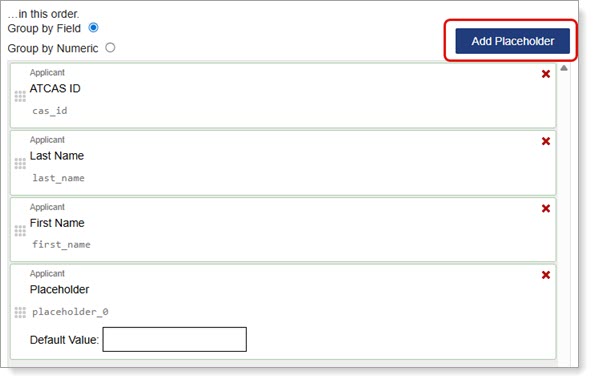
To help with data exports and integration, a new Placeholder field is available in the Export Manager. You can use this field to create space on an export for your Student Information System (SIS) needs or to preemptively create space for new, upcoming fields.
You can add a Placeholder field by clicking the Add Placeholder button on the right side above your chosen fields. See the Exporting Data via the Export Manager page for more guidance and best practices.
Require MFA for All Users Within an Organization
With this enhancement, an organization can now require MFA for all their users. This helps organizations that may have security standards. If MFA is required, then users will be notified when they log in that they need to set up MFA by the deadline date.
Various User Interface Updates
To improve the user experience, the following user interface updates were made.
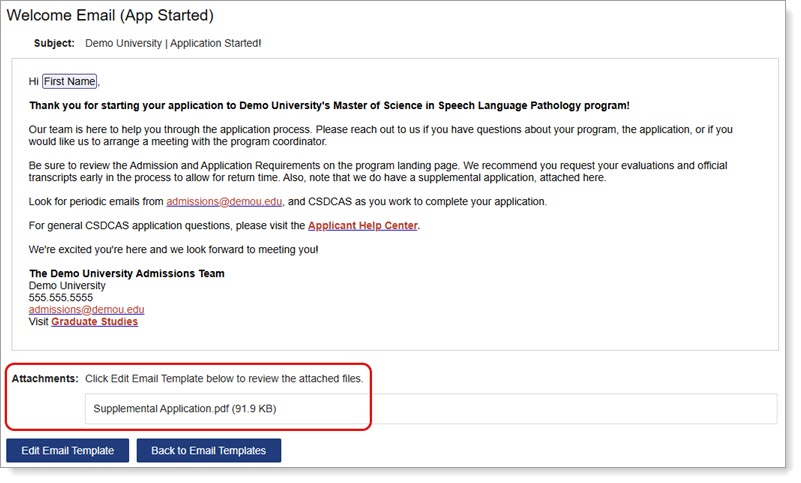
- Email Template Manager: View Attachments When you view a template on the Email Templates Manager page, a list of the attachments linked to that email template also displays.
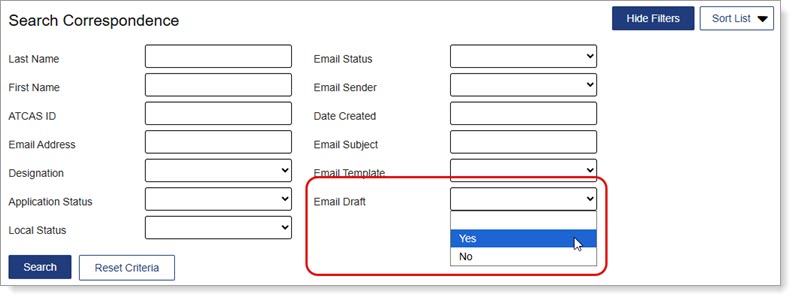
- Search Correspondence Page: Email Draft Filter You can now quickly filter emails in a Draft status from the Search Correspondence page.
Annual Fall Lookup Tables
Many fields in the Applicant Portal contain predefined answer values that applicants can select; for example, the Country and County fields both have predefined answer values. These values are housed in shared “lookup tables.” Periodically, these tables are updated to include additional response options.
The new lookup table values include updates to colleges, degrees, languages, and majors. Review the Shared Lookup Table Updates page for a full list of updates. Note that the Master High School List will be updated in the next release.
If you created a “crosswalk” from our portals to your local data in your SIS/CRM, you may need to update this crosswalk for the newly-added options. For guidance on the optimal implementation of the new values, review the Shared Lookup Table Updates page.
Subscribe to WebAdMIT Release Notes
WebAdMIT Release Notes provide a summary of enhancements and new features that are made available in the Applicant Portal, Applicant Gateway, Configuration Portal, Letters by Liaison, and WebAdMIT. Want to receive Release Notes emails? Subscribe here.
Liaison provides monthly updates on new features and enhancements available within the Applicant Portal, Configuration Portal, WebAdMIT, and information on upcoming training opportunities. Please note that these are only a few highlights of Liaison’s recent enhancements. A complete list of recent WebAdMIT Release Notes is available.
 WebAdMIT Sandbox Environment Refresh WebAdMIT Sandbox Environment Refresh
Are you utilizing the WebAdMIT Sandbox? If not, you should be! Sandbox is a duplicate test platform useful for testing and training purposes; any actions performed in Sandbox will not affect the live data in production. This tool provides users with a safe, “near-production” environment to test applications and run sample exports, among other actions. The WebAdMIT Sandbox is a copy of the WebAdMIT production environment with sensitive applicant information (such as surnames, email addresses, etc.) obfuscated.
The WebAdMIT Sandbox is refreshed between 9:00 a.m. and 2:00 p.m. ET every Monday. If Monday is a US or Canadian holiday, deployment is the next business day and includes all system changes from the preceding release. The WebAdMIT Sandbox environment is refreshed with current (cleansed) production data and program configurations. Any test exports, custom fields, etc., in the current Sandbox will be overwritten.

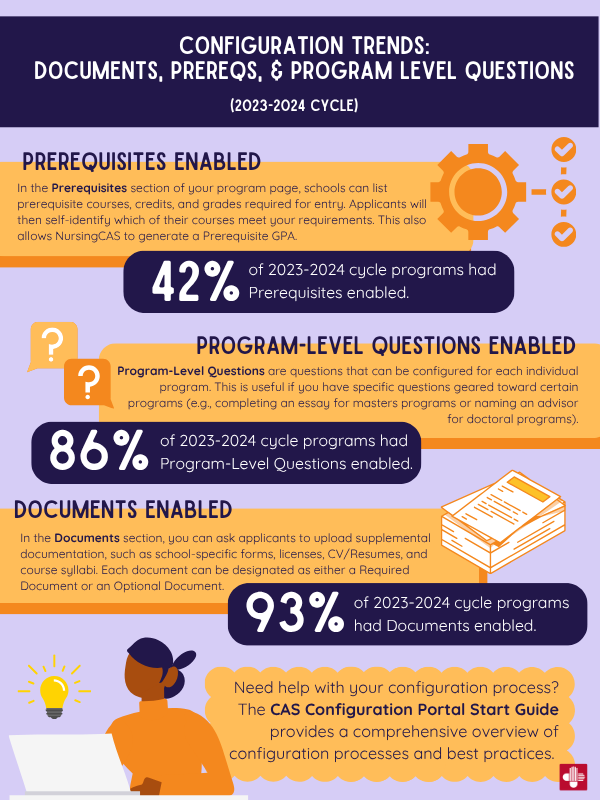
Configuration Trends: Documents, Prerequisites, & Program Level Questions (2023-2024 Cycle)
The fourth section of the NursingCAS application quadrant – “Program Materials” – collects information specific to your program. This section is customized by schools via the CAS Configuration Portal.
Using this portal, you can ensure that your program pages reflect your institution’s branding and provide applicants with core program details (including eligibility requirements and deadlines). You can also enable sections in your application that request additional information relevant to your program, such as program-specific questions, required documents, prerequisites, and evaluations (e.g., letters of reference/recommendation).
In the 2023-2024 NursingCAS Cycle:
- 42% of programs enabled Prerequisites – in this section, schools can list prerequisites courses, credits, and grades required for entry. Applicants will then self-identify which of their courses meet your requirements. This also allows NursingCAS to generate a Prerequisite GPA.
- 86% of programs enabled Program-Level Questions – in this section, schools can configure questions that are specific to individual programs.
- 93% of programs enabled Documents – in this section, you can ask applicants to upload supplemental documentation, including school-specific forms, licenses, CV/resumes, and course syllabi. Each document can be designated as either a Required Document or an Optional Document.
For an overview of the customization options available for your programs, visit the Customizing Your Programs resource in the CAS Configuration Portal Help Center.

Q: How can I add or remove users in WebAdMIT?
A: To make changes to your school’s users in WebAdMIT, you must be an Institution Manager. These users can add new cycles to existing users’ accounts, view and delete all templates created at your organization, and initiate transfer settings. Note that this role can only be granted by a current Institution Manager at your school or by the Client Support Specialist team.
To update your school’s users, Institution Managers can access the Admissions Users feature under the Management panel. To manage existing users’ accounts:
- Open the Management panel and click Admissions Users.
- Use the search filters to find your organization’s WebAdMIT users. By default, only active users are displayed. To view deactivated users, change the Active drop-down to No, or to blank to include both active and deactivated users in your view.
Adding users in WebAdMIT
To add a user, open the Management panel, then click Admissions Users before taking the following steps:
-
- Click New User.
- Enter the new user’s information. First Name, Last Name, and Emailare required fields. You can also identify the user’s role, if applicable.
- Select a Work Group (this controls what permissions the user will have)
- Select the program(s) the user needs access to under Program Assignments (this controls which groups of applicants the user will see).
- Click Submitto save or click Return to Admissions Users to discard the changes.
The user will receive a system-generated email prompting them to create a password.
Deactivating users in WebAdMIT
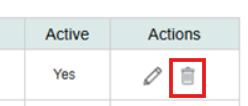
Use the trash icon to deactivate a user. You cannot delete user accounts because WebAdMIT tracks and records user activity.
Edit users in WebAdMIT
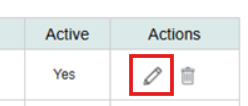
To edit a user, you can simply click the pencil icon to edit an existing user’s account.
For a comprehensive overview of how to manage user accounts, please visit the Managing Users page in the WebAdMIT Help Center.
Support for WebAdMIT School Users
As always, the dedicated WebAdMIT Client Support Specialist Team is available Monday through Friday, 9:00 a.m. – 5:00 p.m. ET to assist with questions about WebAdMIT features. The team can be reached at (857) 304-2020 or webadmitsupport@liaisonedu.com. Training is also available via webinars, on-demand courses, and the Liaison Academy. Please visit the WebAdMIT Help Center for further information.
Make sure to sign up to receive important notices through the Liaison CAS Status page for updates on future CAS and WebAdMIT outages.
If you have any questions, please contact Taylor Jaczko, AACN’s Director of Application Services, at tjaczko@aacnnursing.org. |