

Updates and Events
NursingCAS 2026-2027 Configuration Portal - Now Open!
The 2026-2027 NursingCAS Configuration Portal opened on Monday, May 18. Access to the Configuration Portal in the Prelaunch Environment allows you to edit program pages, features, and requirements for the upcoming cycle. Configuring and submitting your pages is required every year for your programs to launch.
The 2026-2027 cycle will launch on Thursday, August 6. This cycle includes the Summer 2027, Fall 2027, Winter 2028, and Spring 2028 semesters. Programs launching on this date must submit configurations by Friday, July 3. While not required to launch on August 6, we encourage schools to consider this date to maximize recruitment exposure for your programs.
Recording Available: NursingCAS Configuration Training Webinar
AACN recently hosted the NursingCAS: Configuration Training Webinar to prepare users for the upcoming 2026-2027 cycle. If you were unable to attend, please be sure to review the webinar recording and presentation slides. The following topics were discussed:
- Configuration portal terminology and the NursingCAS rollover process
- Steps for configuring your programs
- Features to streamline application reviews
- Best practices for closing out a cycle and preparing for a new cycle
Recordings Available: Pathway to Purpose: Nursing School Admissions 101
AACN hosted a special NursingCAS event series for applicants to celebrate National Nurses Week. Pathway to Purpose: Nursing School Admissions 101 consisted of two one-hour sessions: The Nursing School Application Process – What Students Need to Know and The Nursing School Experience.
Engage with your applicant pool and prepare them for their nursing school journey by sharing recordings of these sessions as an application resource.
Recording Available: Student Recruitment: Echo Targeting Webinar
AACN recently hosted a Student Recruitment: Echo Targeting Webinar. Review the recording to hear from AACN’s partner, Owen Landon of Echo Interactive LLC, and school users as they share how you can use this affordable retargeted banner advertising tool to reach NursingCAS applicants while they surf the internet. Additional information on Echo Targeting is available on the NursingCAS website.
Featured Liaison Academy Course | WebAdMIT Essentials: Dashboards, Applicant Records, and User Setup
Looking for a refresh on WebAdMIT in preparation for the 2026-2027 cycle launch? Register for this Liaison Academy training webinar, WebAdMIT Essentials: Dashboards, Applicant Records, and User Setup. This program is recommended for users new to the platform, and will provide a product overview that covers:
- Navigating the Dashboard
- Reviewing the Applicant Details Page
- Creating Admissions Users and Work Groups
Create a free account with Liaison Academy today and become a NursingCAS super user!
NursingCAS Applicant Newsletter
The NursingCAS Applicant Newsletter, provided by AACN, is emailed to 180,000+ NursingCAS applicants the third week of every month. This newsletter is for programs affiliated with NursingCAS only. Program submissions are FREE and due the Friday prior to publication.
Posts must relate to a program’s Open Seats, any Deadline Extensions that have been implemented, or New Programs that have launched in the Application Portal since the previous newsletter. We recommend including contact information for representatives or links to your website and the NursingCAS application within the announcement. Visit the Newsletter Archive for samples of previous submissions.
Submit an Item to the Applicant Newsletter today! Login is required to access the submission form.
NursingCAS Applicant Events Calendar
The NursingCAS Events Calendar allows you to publicize your program’s information sessions, virtual fairs, open houses, and other recruitment events that connect you with potential applicants!
Submit an Item to the Events Calendar today! Login is required to access the submission form.
In Progress Applicant Report Available as XLS and CSV File Type
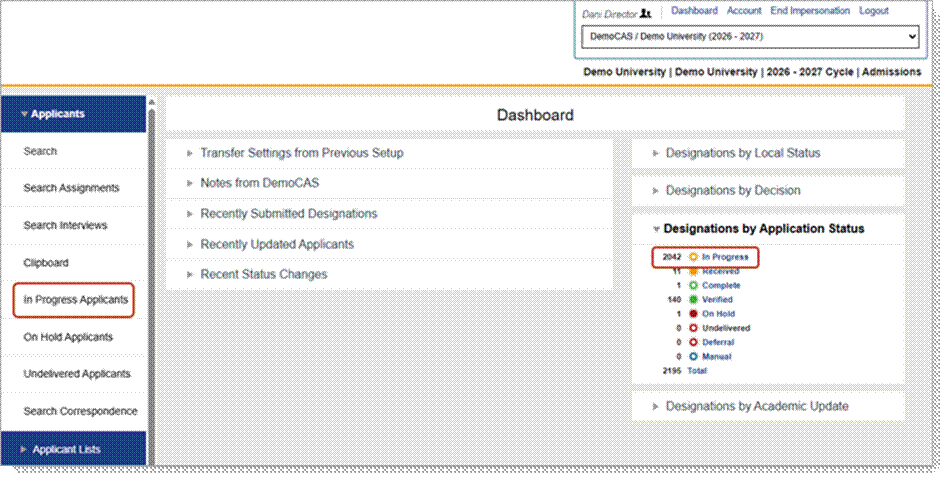
You can now download In Progress applicant data as both an .xls and .csv file from the In Progress page (by clicking In Progress under the Applicants panel in the Menu Bar or by clicking In Progress from the Designations by Application Status panel on the dashboard). Previously, this was only available as an .xls file. Additionally, both file types will automatically be uploaded to SFTP sites. This enhancement allows you to manage applicant data in the format that best works for your data needs.
Simplifying Federal Change: How Liaison Supports Compliance and Adaptation
Liaison is committed to supporting you as you navigate evolving legal and regulatory landscapes. This article provides guidance on how Liaison's products can support your institution's approach to recent legislative changes.
Subscribe to WebAdMIT Release Notes
WebAdMIT Release Notes provide a summary of enhancements and new features that are made available in the Applicant Portal, Applicant Gateway, Configuration Portal, Letters by Liaison, and WebAdMIT. Want to receive Release Notes emails? Subscribe here. See the complete list of recent enhancements in WebAdMIT Release Notes.
WebAdMIT Sandbox Environment Refresh
Are you utilizing the WebAdMIT Sandbox? If not, you should be! Sandbox is a duplicate test platform useful for testing and training purposes; any actions performed in Sandbox will not affect the live data in production. This tool provides users with a safe, “near-production” environment to test applications and run sample exports, among other actions. The Sandbox is a copy of the WebAdMIT production environment with sensitive applicant information (such as surnames, email addresses, etc.) obfuscated.
The WebAdMIT Sandbox is refreshed between 9:00 a.m. and 2:00 p.m. ET every Monday. If Monday is a U.S. or Canadian holiday, deployment is the next business day and includes all system changes from the preceding release. The WebAdMIT Sandbox environment is refreshed with current (cleansed) production data and program configurations. Any test exports, custom fields, etc., in the current Sandbox will be overwritten.

By The Numbers
Configuration Trends: Evaluations and Documents
The fourth section of the NursingCAS application quadrant – “Program Materials” – collects information specific to your program. This section is customized by schools via the CAS Configuration Portal.
Using this portal, you can ensure that your program pages reflect your institution's branding and provide applicants with core program details (including eligibility requirements and deadlines). You can also enable sections in your application that request additional information relevant to your program, such as required documents and evaluations (e.g., letters of reference/recommendation).
In the 2024-2025 NursingCAS Cycle:
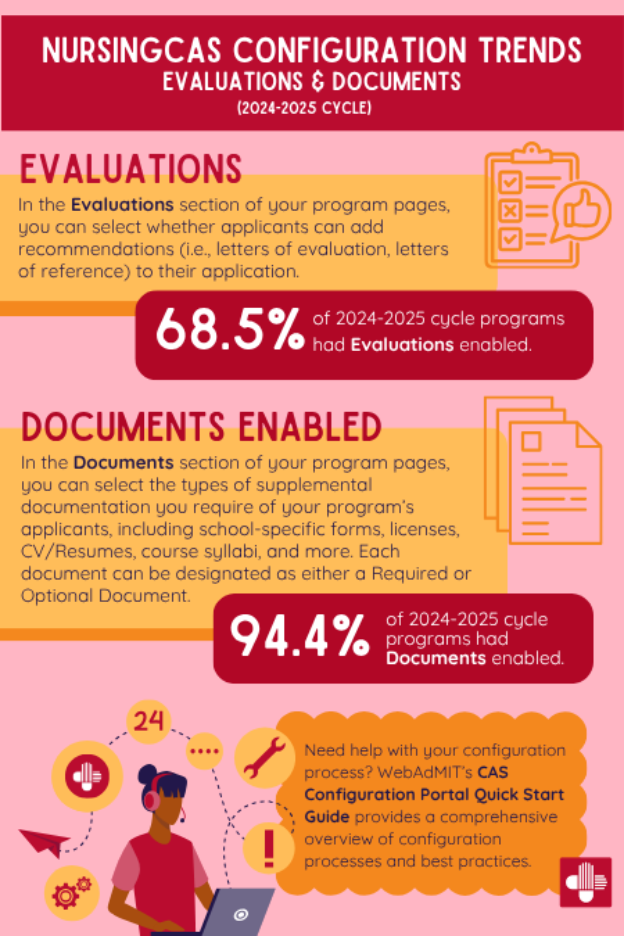
- 68.5% of programs enabled Evaluations - In the Evaluations section of your program pages, you can select whether applicants can add recommendations (i.e., letters of evaluation, letters of reference) to their application.
- 94.4% of programs enabled Documents – In the Documents section of your program pages, you can select the types of supplemental documentation you require of your program’s applicants, including school-specific forms, licenses, CV/resumes, course syllabi, and more. Each document can be designated as either a Required or Optional Document.
For an overview of the customization options available for your programs, visit the Customizing Your Programs resource in the CAS Configuration Portal Help Center.

Q&A

Additional Resources