

Updates and Events
Register for the Discover Nursing School Virtual Fair on November 5
Connect with prospective students at the Discover Nursing School Virtual Fair on November 5 from 10:00 a.m. to 6:00 p.m. ET! This event will bring together students of all levels from across the country who are eager to learn more about nursing programs and explore opportunities to further their nursing careers.
- Reach hundreds of prospective nursing students
- Connect through chat and video capabilities
- Recruit virtually to save time and travel costs
- Access registrant contact information for follow-up outreach
Register through the Virtual Fair homepage by October 29 and choose the package that works best for you. Secure your spot early and give your team time to plan your experience and promote the event to your student networks. Set your own exhibiting hours within the event window, add an extra chatroom to streamline conversations, and explore sponsorship opportunities to boost your visibility.
AACN is excited to serve as a sponsor for this event. All questions should be directed to the event organizer, CareerEco, at events@careereco.com.
Student Recruitment: Echo Targeting Webinar on November 12
Registration is now open for the Student Recruitment: Echo Targeting webinar taking place on November 12, from 2:00 – 2:30 p.m. ET. Echo Targeting is an affordable retargeted digital banner advertising tool that allows member schools to exclusively reach NursingCAS applicants while they surf the internet.
AACN’s partner, Owen Landon of Echo Interactive LLC, will be joined by school users to share how you can use retargeted ads to reach prospective student audiences. Join us to discover why dozens of schools across four health professions utilize Echo Targeting! Please register in advance to attend. Additional information on Echo Targeting is available on the NursingCAS website.
NursingCAS Demo Webinar on November 17
Are any members of your team new to NursingCAS or in need of a refresher? Register now to attend AACN’s NursingCAS Overview: A Demonstration of the Student Application and Admissions Management Portal webinar on November 17 from 2:00 – 3:00 p.m. ET.
Prospective and current NursingCAS users are encouraged to attend this training session, which will provide a walk-through of the platform and introduce users to best practices and useful tools in WebAdMIT.
Unable to attend the webinar? All registrants will receive a copy of the recording.
Recording Available: NursingCAS Link & Learn: Leveraging Local Statuses
AACN hosted the Link & Learn: Leveraging Local Statuses virtual networking session last month. At this session, a panel of NursingCAS superusers discussed their team’s best practices for leveraging WebAdMIT’s Local Statuses feature. View the recording of this session to learn more about your peer institutions’ approaches to this admissions tool.
Recording Available: Preparing and Strengthening Your NursingCAS Application
AACN hosted the Preparing and Strengthening Your NursingCAS Application webinar last month. This student-facing webinar provided an overview of the application from a student perspective. View the recording and share this resource with your applicant pool or admissions users interested in the applicant experience.
Recording Available: The Invisible Funnel: Designing Enrollment Journeys that Nursing Students Never See
AACN hosted a new webinar, The “Invisible Funnel”: Designing Enrollment Journeys that Students Never See, last month. This webinar examined the student enrollment journey and how organic media, paid campaigns, brand storytelling, and experiential touchpoints work together to support modern student decision making. Rather than treating these efforts as separate tactics, the session explored how institutions can design a connected ecosystem to build trust, reinforce awareness, and create multiple opportunities for students to engage. View the recording today!
WebAdMIT Automation for Local Statuses
WebAdMIT now offers a new Automation feature that automatically moves applicants into your Local Statuses based on criteria you set. For example, you can set that when an applicant applies to your program and is in the Verified application status, the applicant will automatically move into an Application Received Local Status. Then, using the Local Status feature, you can program the Local Status to automatically send an email template that includes a welcome message and key details about your program and requirements.
This automation feature simplifies your workflow so that you can perform fewer manual tasks in managing your applicant pool. Review the Creating Automations article to learn more about this feature and example scenarios.
Featured Liaison Learning | Webinar: Navigating Generative Search Results: Brand Visibility, GEO, and AI
This Liaison on-demand webinar explores how AI-driven discovery is changing the rules of visibility in higher education and why traditional Search Engine Optimization (SEO) is foundational to strengthening your brand signals across the digital ecosystem. Watch the webinar recording to:
- Gain a clear understanding of how brand signals influence which institutions appear in AI-powered responses.
- Learn practical strategies for strengthening brand visibility beyond organic rankings.
- Understand how brand visibility efforts support Generative Engine Optimization (GEO) and increase the likelihood of organic mentions.

By The Numbers
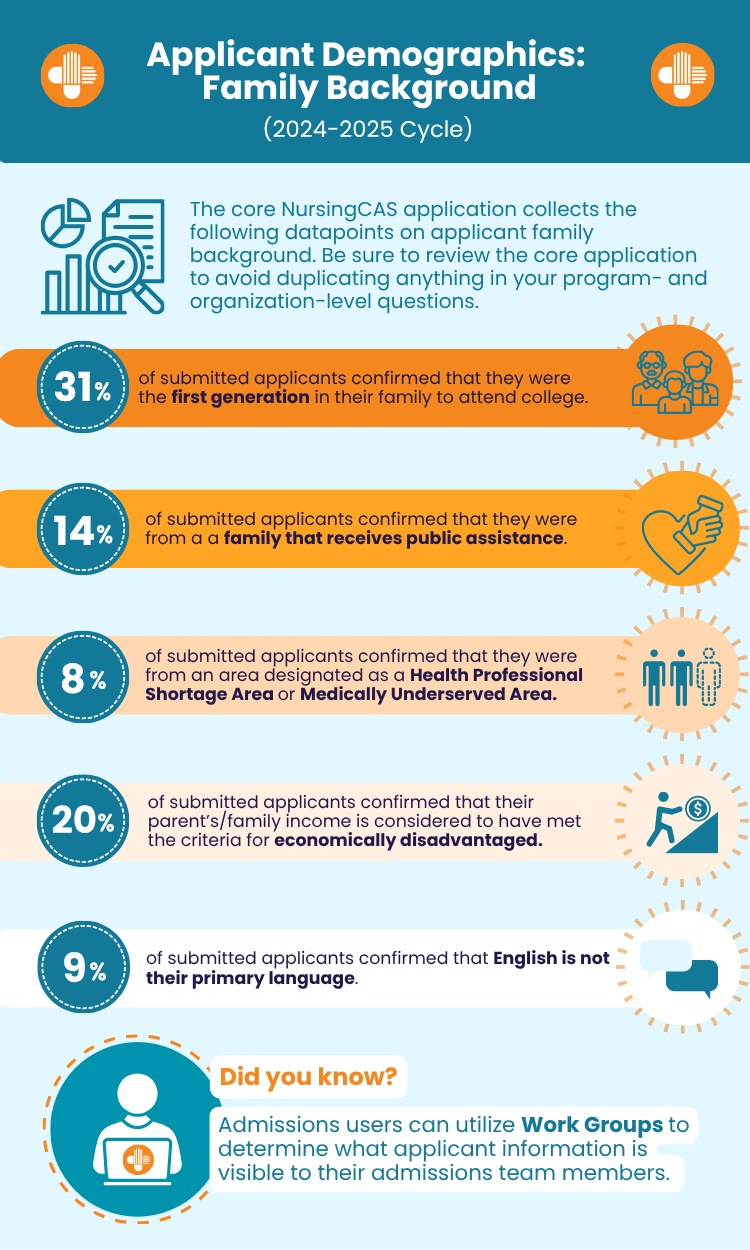
Applicant Demographics: HRSA Indicators – Family Background

Q&A
Q: How can I activate a program after the cycle has launched?
A: Schools are encouraged to configure their programs prior to a cycle's launch, even if they will not immediately open for applications, as this allows applicants to identify possible programs and plan in advance to apply. However, due to the wide range of programs and admission timelines, some schools may choose to configure their programs later in a cycle.
Schools submitting programs for review after a cycle has launched must configure, test, and review all programs in the Prelaunch environment before submitting them for approval.
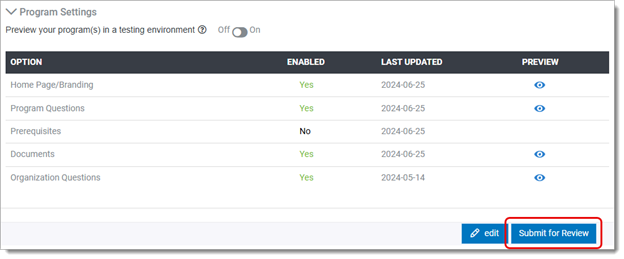
Once you have submitted your program(s), please reach out to Karen Jacobs (kjacobs@liaisonedu.com) and Joe Clark (jclark@liaisonedu.com) to inform them that your program(s) are ready for review. Your program will not be live in the application until it receives approval. If errors are found, your program will be sent back to you for edits.
For more information on the configuration process, please visit the Configuration Portal Help Center.

Additional Resources