

Updates and Events
Managing Overlapping Cycles
The 2026-2027 NursingCAS cycle launched on August 6. The 2025-2026 cycle will remain open through January 29, 2027. With two NursingCAS cycles open simultaneously for 5 months, it is important that users accurately update hyperlinks so students can access the application in the correct cycle portal. We highly recommend that users place “Apply Now” buttons throughout their college website to easily direct students to the application in multiple places. Please reference the URL and Hyperlinks page to review your options.
NursingCAS Link & Learn: Leveraging Local Statuses on September 16
AACN is hosting a virtual networking session, Link & Learn: Leveraging Local Statuses, on Wednesday, September 16 at 1:00 p.m. ET.
At this session, a panel of NursingCAS superusers will discuss their team’s best practices for leveraging WebAdMIT’s Local Statuses feature. Register for this event to share ideas and learn more about your peer institutions’ approaches to this part of the recruitment process. You can expect:
- Brief presentations from fellow NursingCAS school users discussing their Local Status process and workflow
- A follow-up Q&A session to ask presenters more about their processes, brainstorm new ideas, and compare notes
AACN hopes to use this session to foster community-wide conversations and build connections within the NursingCAS community. Register today to attend!
Preparing and Strengthening Your NursingCAS Application on September 22
AACN is hosting the Preparing and Strengthening Your NursingCAS Application webinar on Tuesday, September 22 at 2:00 p.m. ET. This student-facing webinar provides an overview of the application from the student perspective. It is a great resource to pass along to your applicant pool or to share with admissions users interested in the applicant experience. Webinar content includes:
- Detailed overview of the NursingCAS application
- Guidance on requesting fee waivers, transcripts, and submitting coursework entry
- Answers to FAQs (application statuses, references, etc.)
- Tips to avoid common mistakes
- Recommendations to ensure quick application processing times
- Resources available for NursingCAS applicants
The Invisible Funnel: Designing Enrollment Journeys that Nursing Students Never See on September 29
AACN is hosting a new webinar, The “Invisible Funnel”: Designing Enrollment Journeys that Students Never See, on Tuesday, September 29, at 2:00 p.m. ET.
This webinar discusses the “invisible funnels” of the student enrollment journey, reframing enrollment strategy by examining how organic media, paid campaigns, brand storytelling, and experiential touchpoints work together to support modern student decision making. Rather than treating these efforts as separate tactics, the session explores how institutions can intentionally design a connected ecosystem—one that builds trust, reinforces awareness, and creates multiple opportunities for students to engage when they are ready.
Stay on the cutting edge of enrollment management and register for this session today!
Recording Available: Steps to Ensure a Successful 2026-2027 Cycle
With the 2026-2027 NursingCAS cycle now underway, we encourage you to review and share the recording of our cycle launch training webinar, NursingCAS: Steps to Ensure a Successful 2026-2027 Cycle, to set your team up for admissions success. The following topics are discussed:
- WebAdMIT best practices and efficiency measures: local statuses, list manager, faculty/committee member review feature, automated scoring features, and more
- Steps to managing your applicant pool
- Tips for analyzing your applicant pool and recruitment efforts with the Report Manager and Liaison Analytics tools
- AACN and NursingCAS recruitment tools
- NursingCAS and WebAdMIT training resources
Echo Targeting: Cycle Launch Discount Offer
To celebrate the launch of the 2026-2027 cycle, NursingCAS is offering $500 off any Echo Targeting campaign of $1,000 or more. Echo Targeting is a digital advertising program that helps your programs stay in front of prospective nursing students after they visit the NursingCAS application, the NursingCAS.org website, and AACN's Student webpages. Your ad graphics continue reaching these students as they browse websites and social media, keeping your program top of mind throughout their application journey.
Take advantage of this limited time offer and give your recruitment strategy a boost at the start of a new admissions cycle! Contact Owen Landon by September 30 to claim your discount. Schedule a 30-minute call via Calendly, or contact Owen by phone at 617-877-6327 or by email at Owen@Echo-InteractiveLLC.com.
WebAdMIT Automation for Local Statuses
WebAdMIT now offers a new Automation feature that automatically moves applicants into your Local Statuses based on criteria you set. For example, you can set that when an applicant applies to your program and is in the Verified application status, the applicant will automatically move into an Application Received Local Status. Then, using the Local Status feature, you can program the Local Status to automatically send an email template that includes a welcome message and key details about your program and requirements.
This automation feature simplifies your workflow so that you can perform fewer manual tasks in managing your applicant pool. Review the Creating Automations article to learn more about this feature and example scenarios.
Featured Liaison Learning | Learning Journey: Using WebAdMIT’s Export Manager
This Liaison Academy learning journey explores how to create detailed exports containing selected applicant data elements. Exports are particularly useful for committee review meetings and for integration with Student Information Systems (SIS). Learning modules include:
- Creating a Data File with Export Manager in WebAdMIT
- Working with the Export Manager in WebAdMIT
- Using Export Manager’s Advanced Features in WebAdMIT
Create a Liaison Academy account and take the course today!
Annual Fall Lookup Updates
Many fields in the CAS Applicant Portal contain predefined answer values that applicants can select; for example, the Country and County fields both have predefined answer values. These values are housed in shared "lookup tables." Periodically, we update these tables to include additional response options.
The new lookup table values include updates to AP exams, colleges, counties, degrees, and majors. Review the Shared Lookup Table Updates page (linked below) for a full list of updates.
These lookup table updates impact the following portals, some of which you may use. If you created a "crosswalk" from our portals to your local data in your SIS/CRM, you may need to update this crosswalk for the newly-added options. For guidance on the optimal implementation of the new values, review the Shared Lookup Table Updates page.
• API
• Liaison Analytics
• Liaison Outcomes
• WebAdMIT

By The Numbers
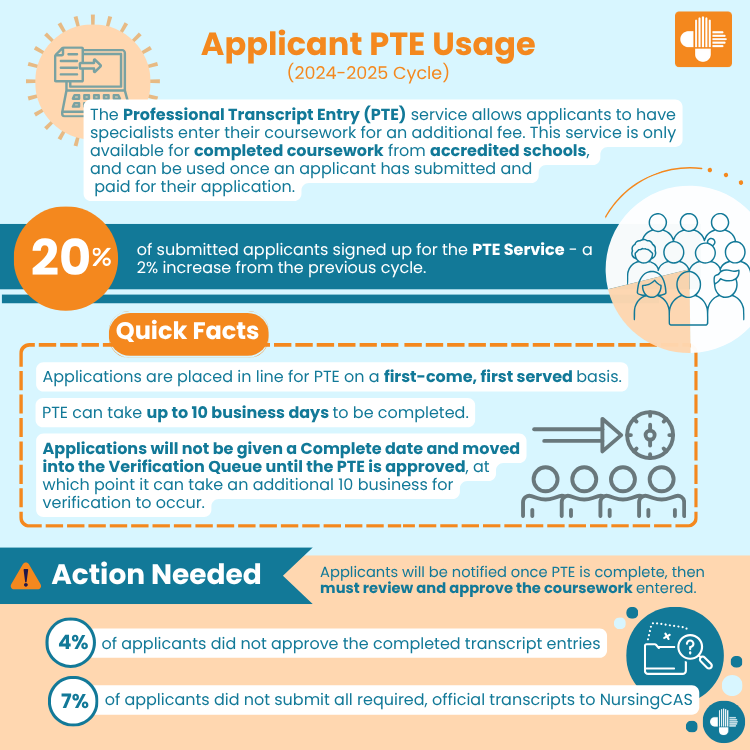
Applicant Demographics: 2024-2025 Cycle PTE Usage

Q&A
Q: What are Local Statuses?
A: Every school has its own processes for reviewing and selecting their applicants. Generally, programs have a series of stages that applicants pass through from the initial application submission to the final decision. Local Statuses are an internal WebAdMIT tracking tool that allows school users to track the progress of applicants by categorizing them based on their stage within your application review process.
Once configured, Local Statuses are visible via a channel in the WebAdMIT Dashboard that tracks your school or program designations by their local status. This provides a bird’s-eye view of the number of applicants in each status and can be used to quickly identify where an applicant is within your process. Users can click into each status to review the applicants within them. From there, users with the correct permissions can review, sort, recategorize, export, and communicate with the applicants in each status.
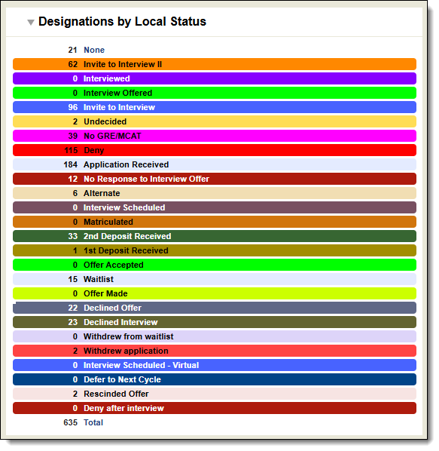
Local Statuses can be highly customized to fit the nuances of your team’s workflow, and you can create as many of them as needed.
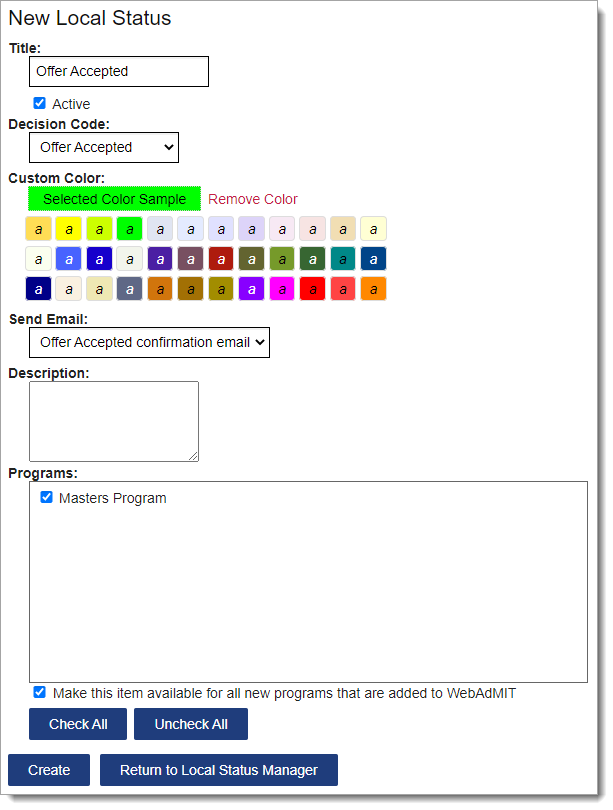
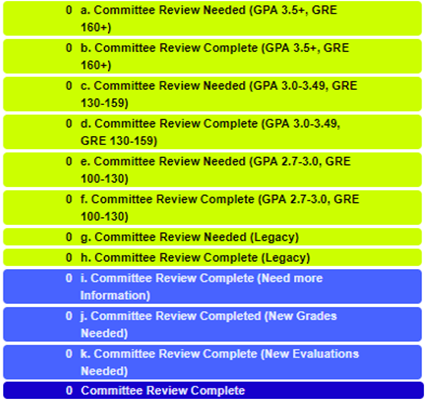
Color-coding and numbering options allow you to get more granular and differentiate statuses within a given process.
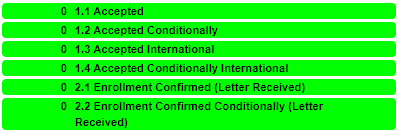
Local statuses can also be incorporated into your communications process. Statuses can be tied to customizable email templates (for example, an “application received” email for students that have just submitted their application) which can be triggered once a student enters the associated status.
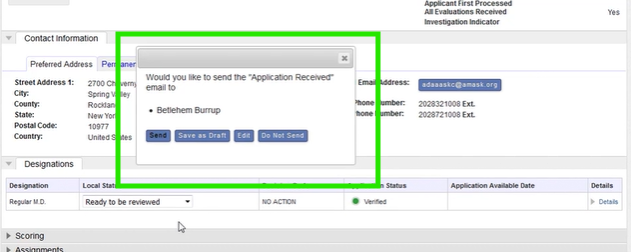
Note that Local Statuses are for internal WebAdMIT use only. Applicants cannot see their Local Status in the Applicant Portal. Once Local Statuses have been created, they can be assigned to applicants:
- Individually, from the Designations panel on the Applicant Details page.
- In batch via Lists, Searches, or the Clipboard.
For an overview of the Local Status feature and instructions on how to get started, please visit the Using Local Statuses and Local Status Best Practices resources in the WebAdMIT Help Center. Automation options are also available for Local Statuses.
AACN’s NursingCAS team will be hosting an upcoming panel discussion on Local Statuses featuring NursingCAS superusers. This session, Link & Learn: Leveraging Local Statuses, will take place on Wednesday, September 16, at 1:00 p.m. ET. Register today to hear fellow NursingCAS users discuss their best practices for making the most out of this tool.

Additional Resources